
Setting Up Alerts
To setup alerts in Grantd:
- Start on the Grantd homepage
- Select the Client tab
- Once on the client page, select the Alerts tab towards the top of the page

Managing Existing Alert Rules
In the Alerts page, you can:
- View what alert rules are currently in place
- Toggle existing alerts on and off at will

Creating New Alert Rules
To create a custom alert:
- Select the + Create Alert Rule button
- Select your alert type from the list of available options (see below)
- Fill out the required details for your chosen alert type
- After all details are populated, select Create Alert
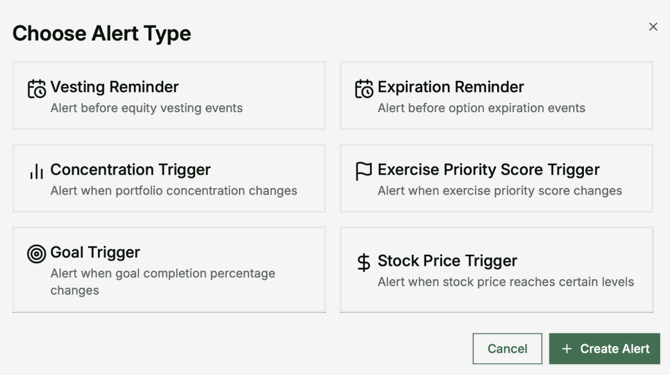
Available Alert Types
Vesting Reminder
Get notified before shares vest
Concentration Trigger
Alert when portfolio concentration reaches specified thresholds
Goal Trigger
Notification when financial goals are reached
Expiration Reminder
Alert before options expire
Exercise Priority Score Trigger
Notification when exercise priority scores reach specified levels
Stock Price Trigger
Alert when stock price reaches target levels